A couple of months ago we upgraded BRIAN to a new version, which should be more easy to navigate through. However, in making it super whizzy and giving you different ways to view your data, it’s not always easy to see the obvious. So, the number one question we get asked is ‘I can’t see where to enter x’. The main thing being grants and professional activities.
The reason for this is because there are new tabs at the top, which show different data.

It would seem logical that all your data is under ‘my profile’ but it isn’t. ‘My Profile’ is just a summary page of what you have previously entered under publications and grants. In order to enter data against your BRIAN account, you need to ensure that you are on the home page, which is symbolised by a picture of a house. The home page will enable you to enter publications, grants and professional activities.
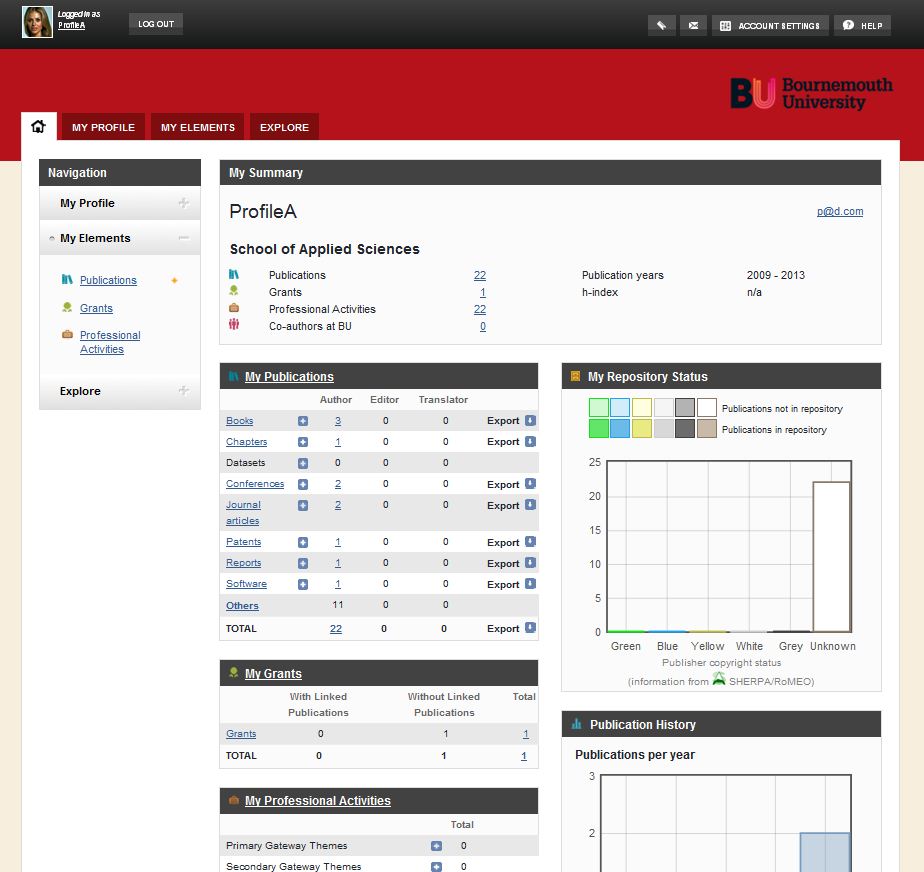
I hope this helps. If you have any queries, please contact us at BRIAN@bournemouth.ac.uk. We’re here to help.
 At last! Grant records on BRIAN







 Congratulation on newly published systematic review
 Equitable Partnerships in Global Health Research
 New Nepal-based paper published last week
 Congratulation to HEMS colleagues on their new book!
 Book edited by BU academics published
 Horizon Europe Cluster 3 (Civil Security for Society) 2026 Calls Now Open
 MSCA Doctoral Networks 2026 Call Information Webinar
 ESRC Festival of Social Science 2026: Application Deadline Extended to Thursday 25 June 2026
 Reminder: Register for the ESRC Festival of Social Science 2026 Information Session
 ECR Funding Open Call: Research Culture & Community Grant – Apply now
 ERC Advanced Grant 2025 Webinar
 Update on UKRO services
 European research project exploring use of ‘virtual twins’ to better manage metabolic associated fatty liver disease